CSS Scroll-Driven Animations
Introduction
For years, advanced scroll interactions on the web depended heavily on JavaScript libraries like GSAP, Locomotive Scroll, and Framer Motion. Creating timeline-based motion tied to scroll position required continuous JavaScript calculations, observers, and rendering orchestration.
But native CSS scroll-driven animations are beginning to change that relationship between motion and the browser itself.
Scroll-driven animations are currently supported in modern Chromium-based browsers (Chrome, Edge) and recent Safari releases. Firefox support is in development under a feature flag. We treat these animations as a progressive enhancement—unsupported browsers will fall back gracefully to standard static layouts.
Why scroll was JS-heavy
To understand why this shift matters, we must look at how we built scroll animations in the past. Standard web animation models were designed around time, meaning the browser progressed an animation from start to finish over a set duration. Because there was no concept of a scroll-driven timeline, we had to capture scroll inputs manually. We attached listeners to the scroll event to continuously measure page position.
We used requestAnimationFrame to schedule style updates in sync with the browser refresh rate to prevent screen tearing. We also relied on intersection observers to detect when elements entered or exited the viewport, and manually managed motion synchronization. Translating scroll offsets into animation progress required custom calculations that JavaScript handled manually. These methods were essential for libraries like GSAP and Framer Motion to build advanced interfaces.
Problems with JS systems
This reliance on JavaScript-heavy orchestration introduced major design-engineering hurdles. Listening to scroll events and modifying DOM styles in real time frequently caused layout thrashing. This happened because reading scroll offsets and writing new CSS transforms forced the browser to recalculate the page layout repeatedly in a single rendering frame.
The result was severe performance overhead, leading to noticeable jank and mobile rendering inconsistencies. Hydration concerns in modern React and Next.js applications added further synchronization complexity, as server-rendered layouts had to match client-side scroll positions. We also had to manage the heavy dependency weight of external motion libraries and write complex code to maintain the animation state across page navigations. Ultimately, these systems added architectural complexity to solve what should be a native browser rendering task.
Native timeline changes
CSS scroll-driven animations solve these problems by integrating the scroll timeline directly into the browser style engine. We can now define a scroll timeline that binds animation progress to the scroll percentage of a container, or a view timeline that tracks an element’s relative position inside the viewport.
Here is a visual representation of how the two timelines track progress:
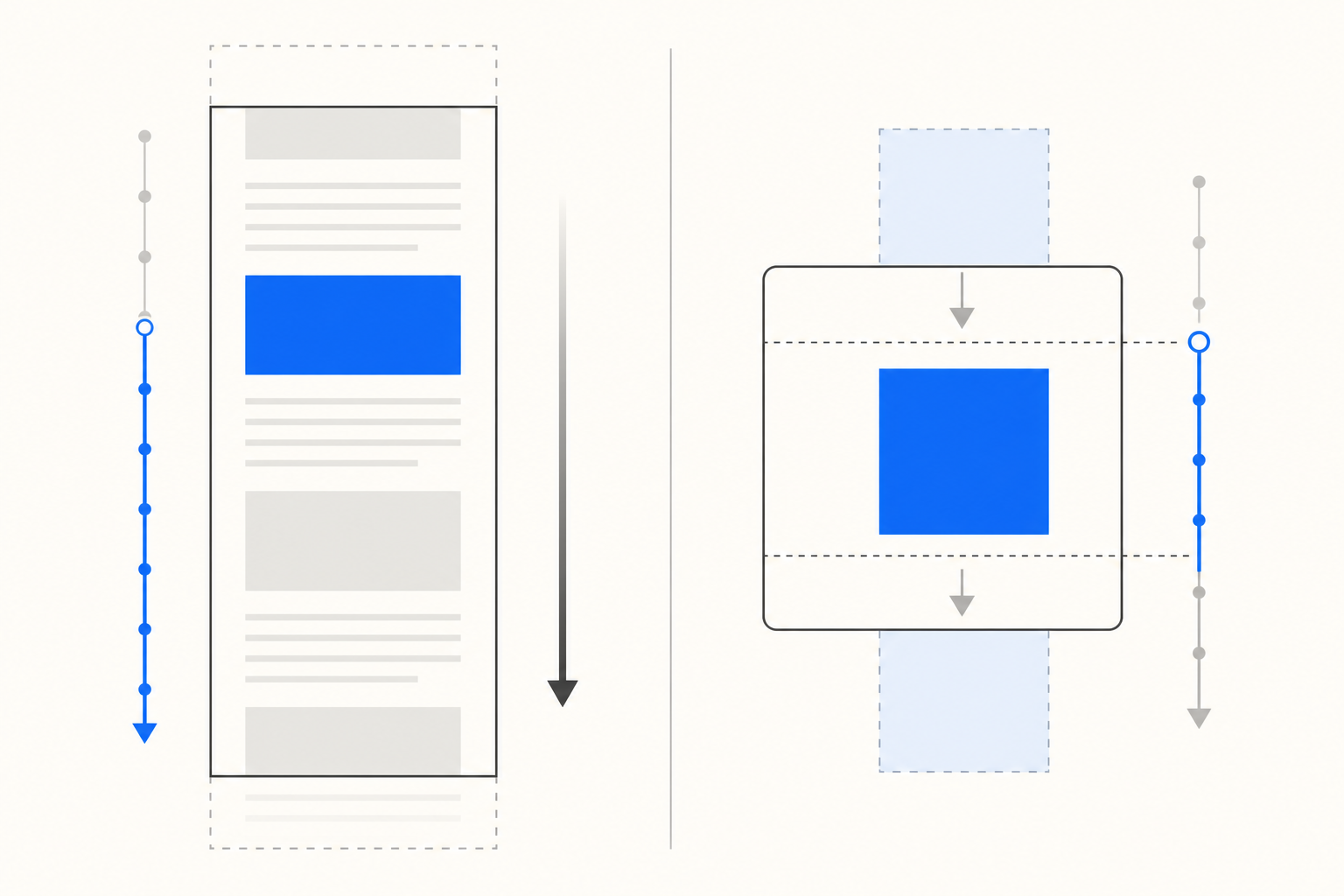
To help visualize the architectural shift, here is how the native CSS properties map to legacy JavaScript implementations:
| Legacy JavaScript Approach | Modern CSS Approach |
|---|---|
| Scroll event listeners | animation-timeline: scroll() |
requestAnimationFrame | Compositor-driven timeline |
IntersectionObserver | animation-timeline: view() |
| Manual offset calculations | animation-range |
| Large external libraries | Native CSS stylesheets |
In addition to anonymous timelines like scroll() and view(), the specification supports named timelines using properties like scroll-timeline-name or view-timeline-name. This allows developers to declare a timeline on a scroll container and reference it on any descendant element across the page, providing robust cross-element animation control without nesting.
By setting properties like animation-timeline and animation-range, we instruct the browser exactly when to start and stop the progress. This declarative approach eliminates the manual math and event listeners.
Demo 1 — Reading progress
The first demo is a progress indicator that tracks your vertical scroll. It uses animation-timeline: scroll() to measure document scroll progress and binds it directly to the width of a progress bar. By setting animation-range: 0% 100%, the progress bar automatically expands across the screen as you read from top to bottom.
Scroll progress
This keeps the layout simple and lets the browser own the animation.
Section 1. The long scroll area gives the progress bar enough distance to feel smooth.
Section 2. The long scroll area gives the progress bar enough distance to feel smooth.
Section 3. The long scroll area gives the progress bar enough distance to feel smooth.
Section 4. The long scroll area gives the progress bar enough distance to feel smooth.
Section 5. The long scroll area gives the progress bar enough distance to feel smooth.
Section 6. The long scroll area gives the progress bar enough distance to feel smooth.
Section 7. The long scroll area gives the progress bar enough distance to feel smooth.
Section 8. The long scroll area gives the progress bar enough distance to feel smooth.
Demo 2 — Scroll parallax
The second demo showcases vertical depth using multiple speed layers. Three cards—Fast, Normal, and Slow—are laid out in a flex-row and translate at different rates driven by the scrollbar of their container. By assigning a custom CSS custom property (--parallax-speed) to each card and binding them to the container's scroll timeline, the layout shifts dynamically as you scroll.
Demo 3 — Reveal on scroll
The third demo is the one you will probably reuse most often. Cards reveal as they enter the viewport, which is a good fit for feature lists, storytelling sections, and case studies.
Reveal on scroll
A subtle fade and lift that matches the rest of the site system.
Entry 1. The motion only appears when the card enters the viewport.
Entry 2. The motion only appears when the card enters the viewport.
Entry 3. The motion only appears when the card enters the viewport.
Entry 4. The motion only appears when the card enters the viewport.
Entry 5. The motion only appears when the card enters the viewport.
Entry 6. The motion only appears when the card enters the viewport.
Entry 7. The motion only appears when the card enters the viewport.
Why native motion matters
These visual patterns demonstrate how native timelines can replace a surprising amount of JavaScript for common interface patterns.
Shifting motion calculations to the browser engine enables powerful optimizations. The browser can run scroll-driven animations on the compositor thread instead of the main thread. This means that even if heavy JavaScript execution blocks the main thread, the scroll animation continues to render smoothly at the device frame rate.
Properties like transform and opacity are the most performant targets for scroll-driven animations. Because they do not trigger layout or paint recalculations, the browser can execute them entirely on the compositor thread for jitter-free rendering.
Transitioning to a declarative motion model also simplifies the codebase, reduces bundle size, and improves long-term maintainability. We no longer need to write complex orchestration scripts; we simply define our transitions in standard stylesheets and let the browser optimize the rendering lifecycle.
CSS limitations
Despite these architectural benefits, native CSS is not a complete replacement for JavaScript. CSS still struggles with complex sequencing, physics-based motion, and advanced timelines. When animations require cross-element orchestration or need to respond dynamically to complex user input, writing them in pure CSS becomes unsustainable.
Coordinating interactive states and managing fallbacks for older browsers also remains a challenge. This is why robust JavaScript motion libraries like GSAP are still essential. They handle the advanced, stateful interactions that native CSS cannot express.
Future of motion
The future of motion design is not about choosing between CSS and JavaScript. It is about understanding where each tool belongs. We use native CSS for layout-invariant transitions, progress indicators, and simple view-linked entries, while reserving JavaScript for highly interactive, dynamic, or stateful motion sequences.
Regardless of the technology, accessibility must remain a priority. We must always check for reduced motion preferences. If scroll-linked motion is decorative, we should disable it entirely to prevent motion sickness and ensure a comfortable reading experience.
By using these native tools responsibly, we can create premium web experiences that are fast, accessible, and performant. The future of motion on the web is likely not CSS versus JavaScript, but understanding where each belongs.
Further reading
For deeper technical specifications and API references, check out: